There are two ways to authenticate:
To authenticate as a client, make a POST request to
{url}/auth and include the following headers:
X-Client-Id: Your client ID
X-Client-Secret: Your client secret
To authenticate as a user, follow these steps:
{url}/auth/login with the following query parameters:
identifier: Your identifier
identifier_type: Your identifier type (
email or
phone_number)
{url}/auth/login and include the following headers:
X-Amz-Security-Token: The code received
X-Amz-Signature: Your session
This will return an access token that you should include in subsequent requests.
Access tokens expire after a certain period. To refresh an access token, use the refresh token provided during authentication.
{url}/auth/refresh with the following headers:X-Amz-Refresh-Token: Your refresh token
refresh_url="{url}/auth/refresh"
refresh_token="your-refresh-token"

new_access_token=$(curl -X POST -H "X-Amz-Refresh-Token: $refresh_token" $refresh_url | jq -r '.AccessToken')
Make sure to replace your-refresh-token with your actual refresh token.
To log out of your session, invalidate your access token by making a POST request to the logout endpoint.
{url}/auth/logout with the following headers:X-Amz-Refresh-Token: Your refresh token
logout_url="{url}/auth/logout"
curl -X POST -H "X-Amz-Refresh-Token: $refresh_token" $logout_url
Make sure to replace $refresh_token with your actual refresh token.
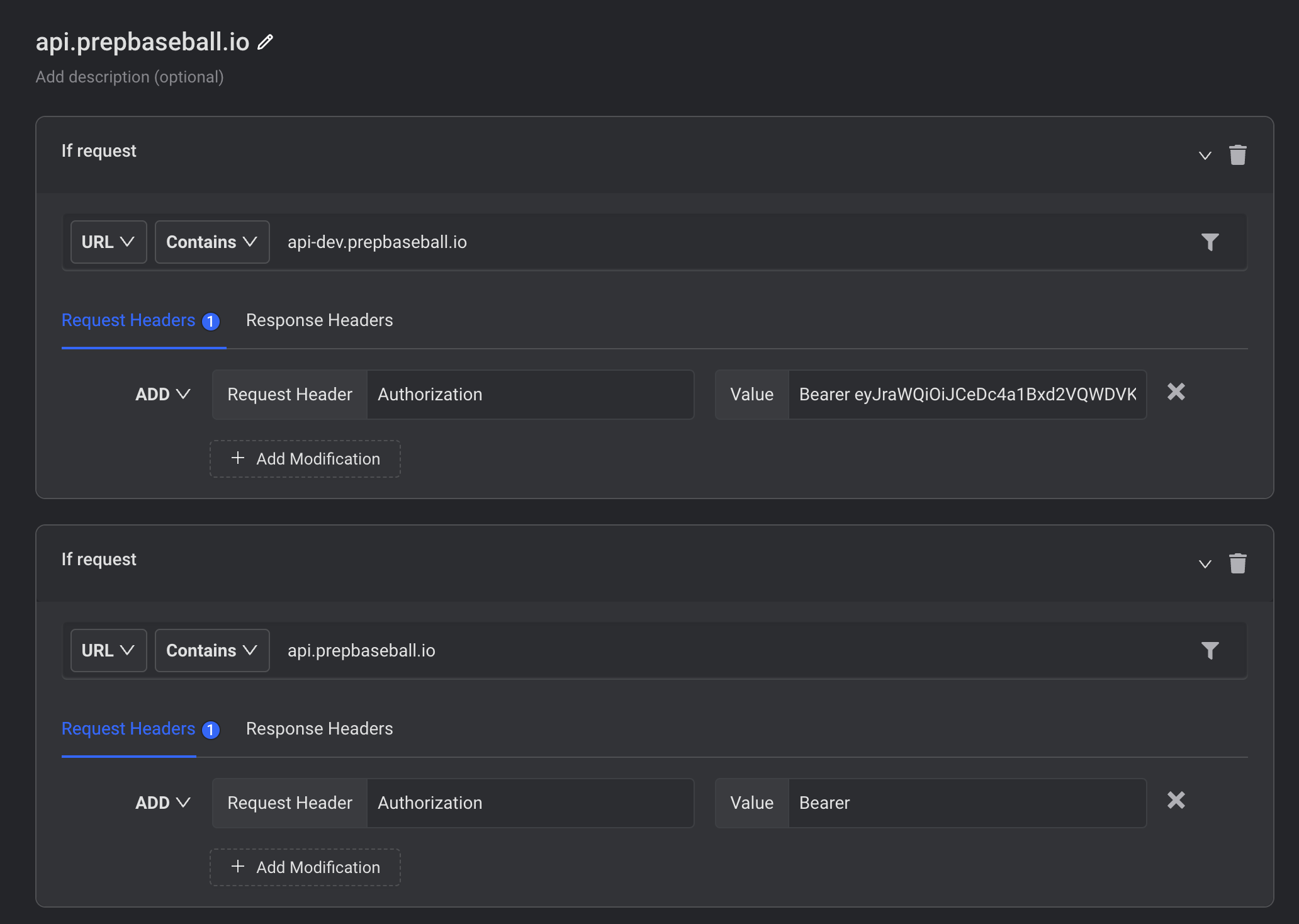
Note: Before making requests to the service documentation routes you will need an access_token, the browser extension "Requestly" can be used to access the documentation routes from inside a Web Browser. Use the extension to add your
access_token value to the
Authorization header to properly access service documentation inside a Web Browser.
Create a HTTP rule similar to one defined in the image below.
This will return an access token that you should include in subsequent requests.
auth_url="{url}/auth"
client_id="your-client-id"
client_secret="your-client-secret"
access_token=$(curl -X POST -H "X-Client-Id: $client_id" -H "X-Client-Secret: $client_secret" {url}/auth | jq -r '.access_token')
Make sure to replace
your-client-id and
your-client-secret with your actual client ID and client secret, respectively.
auth_url="{url}/auth/login"
identifier="your-identifier"
identifier_type="email_or_phone_number"
response=$(curl -X POST -G -d "identifier=$identifier" -d "identifier_type=$identifier_type" $auth_url)
code=Returned Code
session=$(echo $response | jq -r '.session')
access_token=$(curl -X POST -G -d "identifier=$identifier" -d "identifier_type=$identifier_type" -H "X-Amz-Security-Token: $code" -H "X-Amz-Signature: $session" $auth_url | jq -r '.AccessToken')
Make sure to replace
your-identifier and
email_or_phone_number with your actual identifier and identifier type, respectively.
To retrieve the documentation for the
athletic-metrics service using cURL:
doc_url="{url}/athletic-metrics/docs"
curl -H "Authorization: Bearer $access_token" {url}/athletic-metrics/docs